A strong LEGO Death Star 75419 display starts with position and viewing angle before lighting. The model is large, dark and full of interior scenes, so its background determines how much detail an LED setup can reveal.

Choose a three-quarter viewing angle
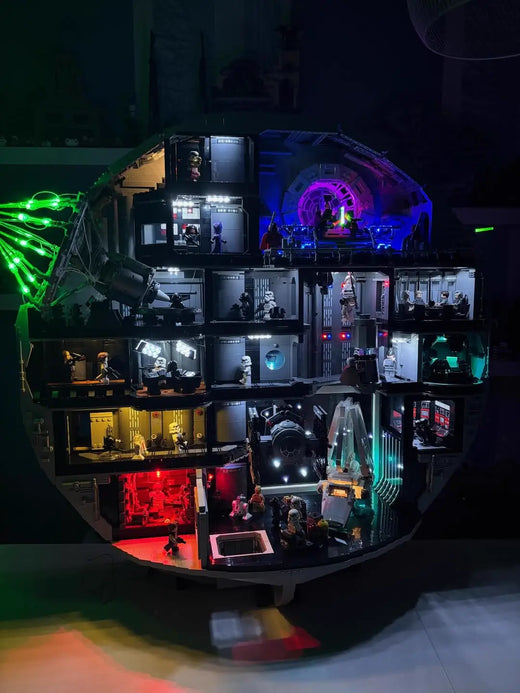
A straight-on view hides depth. A full side view loses too many interior rooms. Start with a three-quarter angle that keeps the superlaser visible while opening the cutaway sections toward the room.
Use a dark, quiet background
A dark blue, charcoal or black background helps the circular outline remain clear. Avoid placing the model in front of a busy shelf. The Death Star already contains many small scenes; the surrounding display should give them room to read.
Layer the light
- Keep exterior light restrained.
- Use local LEDs to separate interior rooms.
- Let the superlaser remain the brightest green effect.
- Avoid lighting every section at the same intensity.

Keep power and controls accessible
Leave enough depth behind the model for the power cable and airflow. Place the controller where it can be reached without rotating the set. If the shelf is enclosed, test the complete setup before fixing the final position.
Photograph the display at eye level
Lower the room light, keep some ambient light and expose for the model rather than the brightest LED. A phone placed at the same height as the central rooms will show more depth than a steep overhead shot.
The strongest Death Star display keeps the silhouette dark, the rooms readable and the controls easy to reach. Lighting should clarify the model, not compete with it.